

 會員中心
會員中心 會員注冊
會員注冊恒溫控制器系統概述
該恒溫控制器系統包含以下幾個功能:
- 可按鍵設定溫度
- 可顯示當前溫度和用戶設定溫度
- 有升溫、降溫模塊
- 可最終達到恒溫
仿真軟件
- Keil 5
- Proteus 8.6
系統設計
電路設計

恒溫控制系統一共有6個模塊,分別是主控芯片模塊、按鍵輸入模塊、設定溫度顯示模塊、當前溫度顯示模塊、溫度采集模塊和升溫、降溫模塊。
- 按鍵輸入模塊:該模塊由4*3的矩陣鍵盤和1個確認按鈕構成。系統剛開始啟動后,用戶通過矩陣鍵盤輸入想要設定的溫度(0°~99°),輸入完畢后按下確認鍵,然后將該溫度數據傳送給主控芯片AT89C51;
- 設定溫度顯示模塊:該模塊由一個2位8段LED數碼管構成,主控芯片AT89C51使用P3口控制該數碼管的段選,使用P2.4和P2.5兩個端口來控制該數碼管的位選。主控芯片AT89C51將從矩陣鍵盤得到的設定溫度信息,通過2位8段LED數碼管顯示出來;
- 溫度采集模塊;該模塊由一個DS18B20溫度傳感器構成。使用DS18B20溫度傳感器采集當前的溫度,并將該溫度信息傳送給主控芯片AT89C51;
- 當前溫度顯示模塊:該模塊由兩個74HC573鎖存器和一個4位8段LED數碼管構成,主控芯片AT89C51使用P2.6和P2.7控制兩個74HC573鎖存器的片選,兩個鎖存器的輸入口均與主控芯片的P0口相連,并使用一個100歐的排阻作為P0口的上拉電阻,兩個鎖存器的輸出口分別與4位8段LED數碼管的段選口與位選口相連;
- 升溫、降溫模塊:該模塊由一個綠色LED和一個紅色LED構成,綠色LED負責降溫,每閃爍一次溫度下降0.5°,紅色LED負責升溫,每閃爍一次溫度上升0.5°。主控芯片AT89C51根據當前溫度和用戶設定溫度之間的差值,來控制升溫還是降溫,以達到恒溫的目的。
軟件代碼編寫
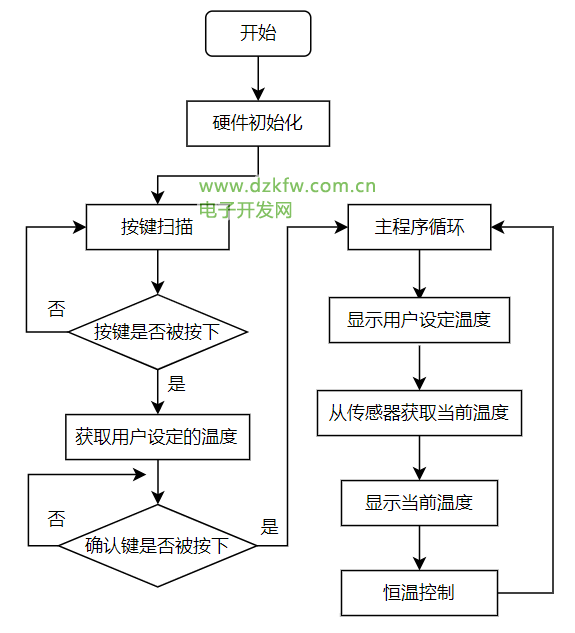
程序的具體流程如下:
- 硬件初始化,關閉所有的數碼管;
- 進行兩次按鍵掃描循環,分別獲取用戶設定溫度的十位和個位,獲取完畢后,判斷確認鍵是否被按下,如果用戶按下確認鍵則進入到主程序循環中;
 while(ok) //用戶設定溫度
 {
  while(key1 == 15)
  {
   key1 = keyscan();
   delay(50);
  }
  while(key2 == 15)
  {
   key2 = keyscan();
   delay(50);
  }
  delay(100);//等待確認鍵
 }
//鍵盤掃描
uchar keyscan()
{
 uchar temp,key;
 key = 15; // 默認值,如果沒有按鍵按下key就為該默認值
 P1 = 0xfe; //掃描第一行
 temp = P1;
 temp = temp & 0xf0;
 if(temp!=0xf0)
 {
  delay(10); // 延時消抖
  temp = P1;
  temp = temp & 0xf0;
  if(temp!=0xf0)
  {
   temp = P1;
   switch(temp) //掃描列
   {
    case 0xee:
     key = 1;
     break;
    case 0xde:
     key = 2;
     break;
    case 0xbe:
     key = 3;
     break;
   }
   while(temp!=0xf0) //等待按鍵釋放
   {
    temp = P1;
    temp = temp & 0xf0;
   }
  }
 }
 P1 = 0xfd; //掃描第二行
 temp = P1;
 temp = temp & 0xf0;
 if(temp!=0xf0)
 {
  delay(10); // 延時消抖
  temp = P1;
  temp = temp & 0xf0;
  if(temp!=0xf0)
  {
   temp = P1;
   switch(temp) //掃描列
   {
    case 0xed:
     key = 4;
     break;
    case 0xdd:
     key = 5;
     break;
    case 0xbd:
     key = 6;
     break;
   }
   while(temp!=0xf0) //等待按鍵釋放
   {
    temp = P1;
    temp = temp & 0xf0;
   }
  }
 }
 P1 = 0xfb; //掃描第三行
 temp = P1;
 temp = temp & 0xf0;
 if(temp!=0xf0)
 {
  delay(10); // 延時消抖
  temp = P1;
  temp = temp & 0xf0;
  if(temp!=0xf0)
  {
   temp = P1;
   switch(temp) //掃描列
   {
    case 0xeb:
     key = 7;
     break;
    case 0xdb:
     key = 8;
     break;
    case 0xbb:
     key = 9;
     break;
   }
   while(temp!=0xf0) //等待按鍵釋放
   {
    temp = P1;
    temp = temp & 0xf0;
   }
  }
 }
 P1 = 0xf7; //掃描第四行
 temp = P1;
 temp = temp & 0xf0;
 if(temp!=0xf0)
 {
  delay(10); // 延時消抖
  temp = P1;
  temp = temp & 0xf0;
  if(temp!=0xf0)
  {
   temp = P1;
   switch(temp) //掃描列
   {
    case 0xe7:
     key = 0;
     break;
    case 0xd7:
     key = 0;
     break;
    case 0xb7:
     key = 0;
     break;
   }
   while(temp!=0xf0) //等待按鍵釋放
   {
    temp = P1;
    temp = temp & 0xf0;
   }
  }
 }
 return key;
}
- 在主程序循環中,首先調用dis_set()函數顯示用戶設定溫度;
for(i=20;i>0;i--)
 dis_set(key1, key2); //顯示用戶設定的溫度
//顯示設定溫度函數
void dis_set(uchar k1, uchar k2)
{
  display2(1, k1);
  display2(2, k2);
  display2(0, k1);
}
//設定溫度數據顯示函數
void display2(uchar num, uchar tem_data)
{
 if(num==0)
 {
  S1 = 1;
  S2 = 1;
  delay(5);
 }
 if(num==1)
 {
  S1 = 0;
  S2 = 1;
  P3 = table[tem_data]; //table為 0-9的16進制編碼表
  delay(5);
 }
 else if(num==2)
 {
  S1 = 1;
  S2 = 0;
  P3 = table[tem_data];
  delay(5);
 }
}
然后再從溫度傳感器獲取當前溫度,獲取當前溫度的流程如下圖所示,先調用DSreset()函數進行溫度傳感器的初始化,再調用temwrite()函數,對傳感器寫入溫度轉換的指令,進行溫度獲取和轉換,然后調用get_tem()函數對傳感器寫入讀取寄存器指令,從寄存器中讀取存儲的溫度數據,并對該數據進行精度轉換處理,最后獲得一個保留了1位小數的當前溫度數據;

temchange();    //獲取當前溫度
//溫度獲取和轉換函數
void temchange(void)
{
 DSreset();
 delay(1);
 temwrite(0xcc); //寫跳過ROM指令
 temwrite(0x44); //寫溫度轉換指令
}
//讀取寄存器中存儲的溫度數據
uint get_tem(void)
{
 uchar l8,h8;
 DSreset();
 delay(1);
 temwrite(0xcc); //寫跳過ROM指令
 temwrite(0xbe); //寫讀寄存器指令
 l8 = temread(); //讀低8位數據
 h8 = temread(); //讀高8位數據
 tem = h8;
 tem = tem<<8;
 tem = tem|l8; //合成一個16位數據
 f_tem = tem*0.0625;
 tem = f_tem*10+0.5; //*10用于保留1位小數點,+0.5用于四舍五入
 return (tem);
}
DS18B20溫度傳感器的基本操作代碼如下,各項操作要嚴格遵守DS18B20溫度傳感器的時序圖,延時時間要足夠,可以根據使用的主控芯片適當地修改循環的次數來調整延時。
初始化
//溫度傳感器初始化
uint DSreset(void)
{
 uint i;
 DS = 0;
 i = 73;
 while(i>0)
  i--;
 DS = 1;
 i = 0;
 while(DS)
 {//等待DS18B20拉低總線
  delay(1);
  i++;
  if(i>10)
  {
   return 0;//初始化失敗
  }
 }
 DS = 1;
 return 1;//初始化成功
}
讀1位數據
//讀1位數據
bit temreadbit(void)
{
 uint i;
 bit tem_bitdata;
 DS = 0;
 i++; //延時
 DS = 1;
 i++;
 i++;
 tem_bitdata = DS;
 i = 10;
 while(i>0)
  i--;
 return(tem_bitdata);
}
讀1字節數據
//讀1字節數據
uchar temread(void)
{
 uint i;
 uchar j,tem_data;
 for(i=1;i<=8;i++)
 {
  j = temreadbit();
  tem_data = (j<<7)|(tem_data>>1); //移位,讓最低位在最后面
 }
 return (tem_data);
}
寫1字節數據
//寫1字節數據
void temwrite(uchar tem_data)
{
 uint i;
 uchar j;
 bit send_bitdata;
 for(j=1;j<=8;j++)
 {
  send_bitdata = tem_data&0x01; //取要發送數據的最低位
  tem_data = tem_data>>1; //右移一位
  if(send_bitdata) //寫1
  {
   DS = 0;
   i++;
   i++;
   DS = 1;
   i = 10;
   while(i>0)
    i--;
  }
  else     //寫0
  {
   DS = 0;
   i = 10;
   while(i>0)
    i--;
   DS = 1;
   i++;
   i++;
  }
 }
}
- 獲取完當前溫度,調用dis_tem()函數顯示當前溫度;
for(i=20;i>0;i--)  //顯示當前溫度
 dis_tem(get_tem());
//顯示當前溫度函數
void dis_tem(uint t)
{
 uchar i;
 i = t/100; //取溫度的十位
 display1(1,i);
 i = t%100/10; //取溫度的個位
 display1(2,i+10);
 i = t%10; //取溫度的小數點后一位
 display1(3,i);
}
//當前溫度數據顯示函數
void display1(uchar num, uchar tem_data)
{
 WE = 1; //選位,低電平有效
 P0 = ~((0x01)<<(num));
 WE = 0;
 DU = 1; //選段,高電平有效
 P0 = table[tem_data];
 DU = 0;
 delay(10);
}
- 將當前溫度和用戶設定溫度傳入deal()函數,進行恒溫控制,在恒溫控制函數deal()中,根據判斷當前溫度和用戶設定溫度之間的差值進行不同的處理,如果當前溫度小于用戶設定溫度,就進行升溫處理,即紅燈閃爍一次,每閃爍一次溫度上升0.5°,如果當前溫度大于用戶設定溫度,就進行降溫處理,即綠燈閃爍一次,每閃爍一次溫度下降0.5°,如果當前溫度與用戶設定溫度想等,則不做處理,只顯示溫度;
void deal(uint t, uint t_set)
{
 uchar i;
 if(tt_set)
 {
  work(15, 0x40); //降溫
 }
 else
 {
  i = 15;
  while(i--)
   {
    dis_tem(tem_set);
    dis_set(key1, key2);
   }
 }
}
//升溫、降溫模塊
void work(uint s, uchar led)
{
 uchar i;
 if(led==0x20)
 {
  i = s;
  led0 = ~(led0); //燈亮
  tem = tem+5;
  while(i--)
  {
   dis_tem(tem);
   dis_set(key1, key2);
  }
  led0 = ~(led0); //燈滅
  i = s;
  while(i--)
  {
   dis_tem(tem);
   dis_set(key1, key2);
  }
 }
 else
 {
  i = s;
  led1 = ~(led1); //燈亮
  tem = tem-5;
  while(i--)
  {
   dis_tem(tem);
   dis_set(key1, key2);
  }
  led1 = ~(led1); //燈滅
  i = s;
  while(i--)
  {
   dis_tem(tem);
   dis_set(key1, key2);
  }
 }
}
- 進行一次恒溫控制后,系統又回到主程序循環的起始點,不斷重復上述3-5步驟,使溫度保持在用戶設定的溫度,達到恒溫的效果。
 返回頂部
返回頂部 刷新頁面
刷新頁面 下到頁底
下到頁底